
Key Curry Documentation for version 1.0α © 2010 by Edward H. Trager. All Rights Reserved. Released April 19, 2010.
Key Curry is a web-based software component that allows you to easily type many world languages and orthographies in web-based forms and rich internet applications. The software uses a user interface framework called Gladiator Components and the popular jQuery JavaScript library as a foundation and works in major browsers like Firefox, Safari, Google Chrome and Opera.
Key Curry provides everything you need, so there is no need to install complex software on your computer. Developers can incorporate Key Curry into web applications with a few lines of JavaScript code.
In addition to supporting major world languages and orthographies, Key Curry makes it extremely easy for language advocates and web developers to provide support for the orthographies of minority languages, especially the many languages that are not currently supported by the major operating system vendors.
Key Curry and Gladiator Components are copyright © 2010 by Edward H. Trager. Please direct licensing and other inquiries to: ed dot trager at gmail dot com.
1.1. Click on Key Curry’s keyboard button:
1.2. You can alternatively press CTRL+k or ALT+k if the cursor is already focused in an input box or text input area in a web form or application.
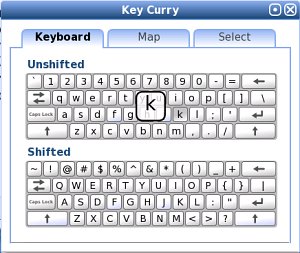
1.3. Key Curry’s visual interface should appear on screen:
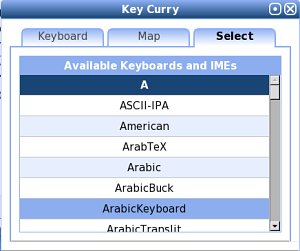
1.4. Click on the Select tab and then choose a keyboard layout or input method:
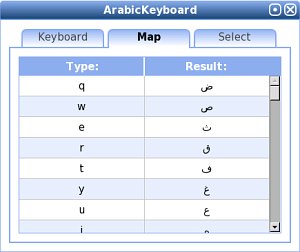
1.5. Key Curry will automatically display the Map tab when a key map or input method has been successfully loaded. The mapping table shows which key or sequence of keys are used to type the desired orthography:
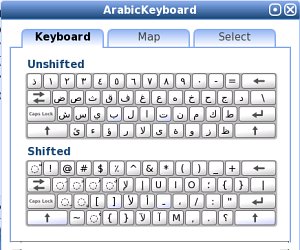
1.6. The Keyboard tab will now also display the new keyboard layout:
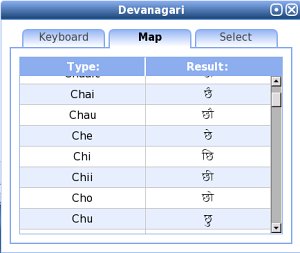
1.7. N-to-1 Mappings. Note that key mappings are not limited to one-to-one mappings. In many cases, a sequence of two or more input keys are used to achieve a single result. It is therefore important to examine the Map tab because additional key sequences that are not visible on the Keyboard tab may be available. For example, key maps for Indic orthographies often map a sequence of multiple input keys to a single output cluster, as in the Devanagari example shown here:
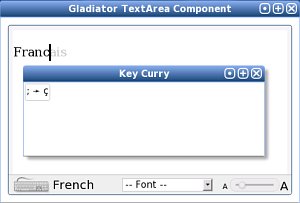
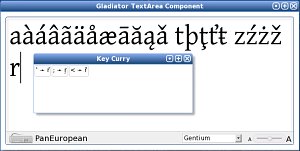
1.8. Key Prompter. Key Curry includes a key prompter to inform you of key sequence options. For the French key map shown below, the key prompter indicates that typing a semicolon “;” immediately after letter “c”, will give c-cedilla “ç” as the result:
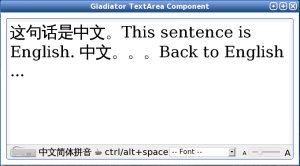
1.9. Pausing Key Processing. Pressing CTRL + SPACEBAR or ALT + SPACEBAR toggles key processing on or off. As the example below shows, this permits you to effortlessly do things like insert a span of English text in the middle of Chinese without having to unload the Chinese IME:
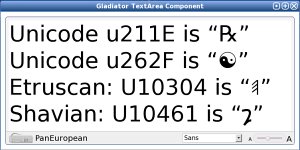
1.10. Unicode Hex Values. Key Curry supports direct conversion of Unicode hex values to Unicode characters. For the basic multilingual plane, type a lowercase letter “u” followed by a sequence of four hex digits. For the supplementary plane, type an uppercase letter “U” followed by a sequence of five hex digits. This functionality is always available, regardless of which key map or input method is currently selected:
2.1. Key Curry provides a) over 130 different key maps for numerous world language orthographies, as well as b) complex input method engines (IMEs) for East Asian orthographies such as Chinese and Korean.
2.2. Yudit-based Key Maps. Many of the key maps available in Key Curry were originally developed for use in the Open Source Unicode text editor Yudit written by Gaspar Sinai. In fact, Key Curry uses essentially the same key map file format as that used in Yudit. As a result, almost any key map designed for Yudit can also be used with Key Curry.
Developer's Note: The Yudit key map format is a simple ASCII/UTF-8 text file format which makes it is very easy for language advocates to develop new key maps. Sometimes minor modifications of a Yudit key map file are required because Key Curry’s key map parser is not as sophisticated as Yudit’s. The document, How to make a key map for Key Curry provides instructions. Map files are loaded via AJAX and converted to a JSON format on the fly. Direct support for JSON key maps is possible.
In this document, the majority of key maps are not described in detail. However, several are of special interest and deserve description. In addition, we are working hard to develop key maps for languages that historically have not been well-supported by the major operating system vendors. A few of these are also described below.
2.3.1. Pan-European. The Pan European or Grand Latin key map makes it easy to type the majority of Latin-based European languages without having to frequently change key maps. The mapping rules are intuitive, easy to remember, and will have you typing all your favorite languages in minutes!
2.3.2. Pan-African. Experimental. The Pan-African keymap is intended to be a comprehensive key map covering all of the Latin-based orthographies used in African languages. The key map is primarily based on a review of Denis Jacquerye’s Characters needed for African orthographies in Latin writing system. The document A Pan-African Latin Keyboard Map for use with Key Curry (PDF) provides a full description of this experimental key map.
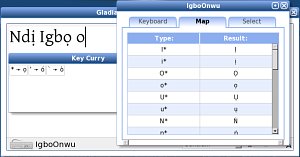
2.3.3. Igbo. Experimental. The Nigerian Latin-based Igbo Onwu orthography has not historically been well-supported on computer systems. Key Curry provides several experimental variations of an Igbo Onwu key map, all of which are intuitive and easy to use. In one variant, the asterisk key, “*” is typed to provide the diacritic dot. In the other variant, the Latin lowercase letter “x” is typed to provide the diacritic dot. Please provide us feedback on which variant is most useful to you. Thanks!
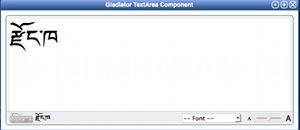
2.3.4. Dzongkha (རྫོང་ཁ). Experimental. This Dzongkha key map is based on the charts and keyboard layout by the Dzongkha Development Commission of Bhutan. Note that in this Key Curry implementation, we use the percent key, “%” instead of “AltGr” to access less commonly used characters. Please provide us feedback on this keymap. Thanks!
Key Curry provides infrastructure to support:
At the present time (2010.04.18), several IMEs for Chinese and one IME for Korean are available. Several additional specialized IMEs are also discussed below.
NOTE: On slow network connections, Chinese IME data may take 30-45 seconds to load. Please be patient! 请注意:在慢的网连接上, 下载输入法的数据可能要花 30-45 秒钟, 请耐心等待!
Developers Note: For Chinese, we are currently working hard to develop a better and more comprehensive word list database (词库). We intend that this new database will serve as a single, unified resource for creating the IME hash tables for both Simplified (简体) and Traditional (繁體) Chinese in the future.
Developers Note: At the current time (2010.04.18), a Japanese IME is not yet available because we do not yet have a word list database resource for Japanese.
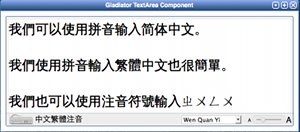
2.4.1. Simplified Chinese Pinyin IME 中文 - 简体拼音输入法. Use pinyin phonetics without tone marks or spaces to select single characters and words. The most common characters and words will appear at the top of the pick list and can be chosen by pressing the numerals 1-9 on the keyboard. Additional pick list entries can be chosen by typing the CAPITAL letter A-Z corresponding to an entry in the pick list. Rare entries at the end of a long pick list may be selected by clicking on the entry using the mouse. Common full-width punctuation marks (标点) are available on the key map for this method.
2.4.2. Traditional Chinese Pinyin IME 中文 - 繁體拼音輸入法. This IME works identically to the pinyin IME for Simplified Chinese but produces traditional character output instead.
2.4.3. Traditional Chinese ZhuYin (Bopomofo) IME 中文 - 繁體注音輸入法. Use zhuyin (bopomofo) phonetics without tone marks or spaces to select single characters (單字) or words (詞). The most common characters and words will appear at the top of the pick list. Due to the zhuyin keyboard layout, it is necessary to press the SHIFT KEY plus the corresponding numeral 1-9 to select a common entry. Additional pick list entries can be chosen by typing the CAPITAL letter A-Z corresponding to an entry in the pick list. Rare entries at the end of a long pick list may be selected by clicking on the entry using the mouse. Due to restrictions imposed by the zhuyin keyboard layout, only a subset of full-width punctuation marks (標點) are available on the key map for this method.
2.4.4. Korean 한글. Key Curry provides only a very simple Korean input method. Complete consonant-vowel-consonant (CVC) jamo syllables are automatically converted to hangul as you type. For consonant-vowel (CV) jamo syllables, use the semicolon “;” to complete the syllable and initiate conversion to hangul.
Developer’s note: Key Curry does not yet provide an IME for Korean hanja (韓文漢字).
2.4.5. Pinyin Romanization 汉语拼音罗马字母. This new input method engine allows you to type pinyin syllables using the digits 1-4 as tone markers at the end of a syllable and have the syllables automatically converted to pinyin syllables using diacritical marks over the vowels. This method also requires that you use the letter “v” to represent the vowel “ü”. A few examples are given below:
| Type | Result |
|---|---|
| xiao3 | xiǎo |
| zhei4 | zhèi |
| chuan2 | chuán |
| Zhong1guo2 | Zhōngguó |
| lv3you2 | lǚyóu |
| Zhou1 En1lai2 | Zhōu Ēnlái |
| Nv0 -or- Nv5 | Nü |
| lve0 -or- lve5 | lüe |
| Ng2 | Ńg |
2.4.6. Unicode Symbol Names IME. This new input method engine allows you to type partial or full names of Unicode symbols to obtain a pick list of symbols whose names match the search key. Type the search key in lower-case letters. Then select the matching entry that you want by typing the corresponding ordinal 1-9, or corresponding capital letter A-Z. You can also choose an entry by clicking on it with the mouse.
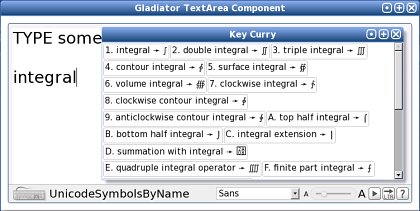
This method currently supports entry of all Unicode v. 6.0 Basic Multilingual Plane (BMP) symbols.
